MyObservatory (我的天文台)
- 3.9
- Rating
- 5.00M
- Installs
- Free
- Price

 Analysis by App-foxy
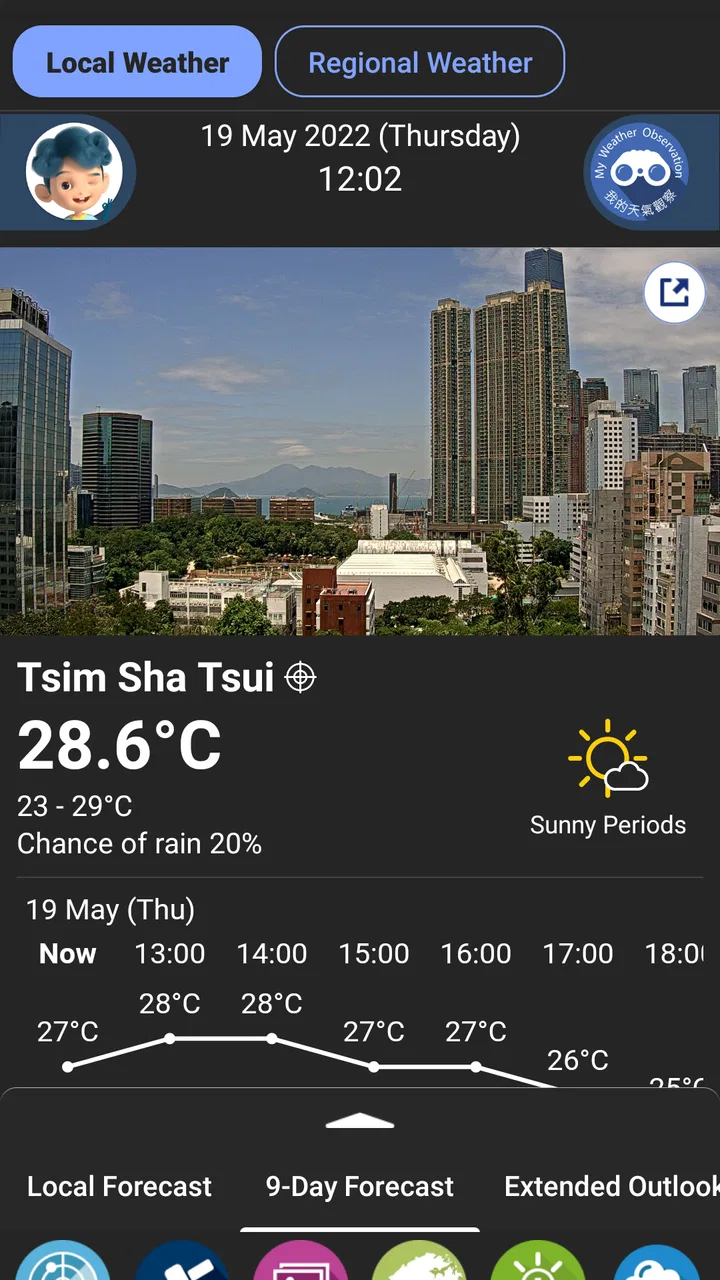
When I need a quick weather check in Hong Kong, I want more than a sunny or rainy icon. I want to know whether a warning has been issued, whether conditions may change before I leave, and whether the information comes from a source focused on the place I am actually in. That is where MyObservatory makes sense. It is a free weather app from the Hong Kong Observatory, built around local weather information and warning notifications rather than a broad, worldwide forecast experience.
I approached it as I would use it on an ordinary day: check the morning conditions, decide what to carry, look again before travelling, and see whether an official warning changes the plan. The app is not trying to be a lifestyle dashboard or a social weather tool. Its value is more practical. It puts Hong Kong weather information in one dedicated place, with an emphasis on alerts and local service information.
That focus explains both why I find it useful and why I would not recommend it to everyone. If you live in Hong Kong, visit regularly, or need local warning information, it deserves a serious look. If you mainly want a polished international forecast app with extensive travel tools, animated maps, or a broad set of global locations, another option may suit you better.
You May Also Like

 Blood Strike: 2.5 Anniversary
Blood Strike’s Loadouts Turn Every Drop Into a Tactical Gamble
A close look at Blood Strike’s custom loadouts: how fast access to signature weapons reshapes its battle royale rhythm, rewards preparation, and narrows the gap between fights.

 Pandora - Music & Podcasts
Pandora’s Music Is Easy to Start, but Harder to Recover
Pandora’s strength is its low-effort path from a seed to a station. Its weak spot is how much confidence it asks you to place in connection, setup, and quiet recovery.

 8 Ball Pool
 Is Built on Rivalries, Rematches, and Routine
A close look at the rivalries, rematches, shared routines, and unanswered safety questions that turn a quick pool match into a persistent mobile community.

 Samsung Music
’s Quiet Strength Is Playing What You Already Own
Its reach comes less from spectacle than from dependable access to a personal library. That simplicity is both the app’s strongest retention engine and its ceiling.

 AccuWeather: Weather Radar
AccuWeather Review: A Quick, Clear Forecast for Everyday Decisions
For everyday plans, the best forecast is the one you can understand quickly. AccuWeather makes rain timing, radar, and local conditions easy to act on, with a few trade-offs.

 Hill Climb Racing
Why Hill Climb Racing Still Turns Crashes Into One More Run
A tiny car, a bumpy hill and one more upgrade: Hill Climb Racing keeps resurfacing because its simple chaos makes every near-miss feel personal.
More From Our News Desk
View All News


From checking the sky to making a decision
I find the useful shift happens when a weather check becomes a choice rather than a glance at an icon. MyObservatory gives me a local reference point, but the value comes from connecting that information to a route, an outdoor task, or a change of timing. That practical handoff is especially helpful when more than one person’s plans are affected, which is where household routines come into focus.
The starting condition: what I need before going out
My usual starting point is simple. I am about to leave home, but the sky is not enough of a guide. A bright morning can still turn into an uncomfortable commute, and a short trip can become much less convenient when a warning is active. Instead of opening several sources, I use the app as a first stop for the current local situation and any important notification.
The Hong Kong Observatory is a particularly relevant developer for this purpose because the app is tied to Hong Kong’s own weather service. That local connection is the main reason I would choose it over a generic weather application. A large international app may be attractive and familiar, but its presentation often treats every location in the same way. MyObservatory feels more appropriate when the question is specifically, “What is happening around Hong Kong right now, and is there an official warning I should care about?”
The app is suitable for Everyone, which matches its straightforward public-service role. I can imagine it being useful for a commuter, a parent planning a school run, a delivery worker, a hiker deciding whether to postpone an outing, or a visitor trying to understand local conditions. The important point is that the user does not need to be a weather enthusiast to get value from it.
Step one: opening the app without overcomplicating the check
My first habit is to open the app before making a decision, rather than waiting until the weather has already become inconvenient. I look for the current condition and then give special attention to warning information. That order matters: the temperature or sky description tells me what the moment feels like, while a warning can affect the next part of the day and the safety of an outdoor plan.
This is also where the app’s focused design helps. I am not forced to begin with a long list of unrelated content. The experience is centered on weather service information for Hong Kong, so the check feels closer to consulting a local bulletin than browsing a general-purpose content feed.
My practical tip is to treat the warning area as the decision point, not as an optional extra. Many people open a weather app, glance at the icon, and close it. With this app, the more useful workflow is to check the ordinary forecast and then deliberately look for a warning before committing to a longer journey or outdoor activity.
Step two: turning the information into a plan
Suppose I am leaving for work and expect to spend time outdoors between transport connections. A normal forecast check might tell me to carry an umbrella or wear lighter clothing. A warning notification changes the level of attention. I may allow more travel time, move an outdoor meeting indoors, or decide that a nonessential trip can wait.
This is one of the app’s less obvious strengths: it supports a small but important handoff between weather information and personal planning. It does not make the decision for me, and it should not. Instead, it gives me a reason to pause before assuming that a normal-looking morning will remain normal.
For a family, the same workflow can be more useful than a simple temperature display. A parent can check conditions before a school run, then check again before an afternoon activity. For someone working outdoors, the warning information can become part of a routine: check before starting, check when the work period changes, and avoid relying on a single glance from earlier in the day.
Step three: using notifications as a handoff
Notifications are central to the app’s purpose. The handoff here is from the app to me: instead of remembering to open the weather screen repeatedly, I can use warning notifications as a prompt to reassess my plans. That is valuable on busy days because weather information is most useful when it reaches me before I need to act.
I would still avoid treating any notification as a complete instruction. An alert is a trigger to review the situation, not a substitute for judgment. After receiving one, I would open the app, read the relevant information, and consider where I am going, how long I will be outside, and whether I have a safer alternative. This two-step habit is more reliable than reacting to a notification headline alone.
There is also a useful distinction between a notification workflow and a forecast workflow. The forecast helps me prepare for expected conditions. The notification interrupts my routine when something deserves attention. Keeping those roles separate makes the app easier to use: I do not need to interpret every ordinary forecast as a warning, and I do not ignore a warning simply because the current sky looks calm.
Step four: checking again before the outcome
The final part of my routine happens just before I leave or begin an activity. Weather decisions become stale quickly, especially when the first check was made much earlier. I use the second check to confirm that my plan still makes sense. If conditions remain ordinary, I continue. If a warning has appeared or the situation has changed, I adjust the route, clothing, timing, or activity.
This repeat check is particularly sensible for short trips that involve several outdoor sections. The app may not eliminate uncertainty, but it gives me a consistent place to revisit the information. That consistency is more useful than jumping between a search engine result, a general weather widget, and a social post from someone nearby.
The handoffs between app, phone, and real life
A weather app succeeds or fails at the point where information leaves the screen. In my workflow, the handoffs are clear: the app provides local weather information, the phone surfaces a warning, and I translate that into a real-world choice. The app is strongest at the first two stages. The final stage still depends on common sense and context.
For example, a warning may matter much more to someone walking across an exposed area than to someone staying indoors near their destination. The same information can lead to different decisions. I appreciate that MyObservatory’s role is not to pretend it knows my entire day. It gives me a local reference point, and I decide how much weight it deserves.
Another useful handoff is between household members. One person can check the app before leaving, then tell others whether they should bring protection or reconsider an outing. Because the app is aimed at local weather service information rather than personal journaling or complicated planning, it works well as a shared reference during a quick conversation.
What the result feels like in everyday use
The result is not dramatic, and that is part of the appeal. On a normal day, I get a quicker answer to a practical question. On a day with significant weather, I have a better chance of noticing that the plan needs attention before I am already outside. The app earns its place through repeated small decisions rather than through entertainment.
Its long presence also gives it a sense of continuity. It was released in late 2010, and the current version is 5.20. I do not read that as a reason to expect a flashy interface; I read it as evidence that this is an established service app rather than a newly launched experiment. The experience is best judged by whether it helps me complete the weather-checking workflow efficiently, not by whether it resembles a visually elaborate consumer app.
The app has an average rating of 3.9 from around thirty-six thousand ratings, with over five million installs. Those figures suggest a substantial audience and a mixed but generally viable reception. I would not use the rating alone to decide whether it is right for me, because weather apps are judged differently by people who want local warnings, casual forecasts, travel planning, or visual presentation. Still, the scale indicates that it is not a niche tool used only by specialists.
Where it fits better than a usual weather alternative
Compared with a general weather app, MyObservatory’s clearest advantage is its Hong Kong-specific purpose. A broad alternative may offer more locations, more decorative visuals, or a more familiar global interface. That can be preferable for someone who travels constantly or wants one app for many countries. But for local warning awareness, a dedicated regional service has a more convincing reason to be on my phone.
I also prefer this kind of focused tool when I want to reduce interpretation. A global app may combine information from sources that are useful in different ways, while a local observatory app gives me a direct place to begin. I am not saying it replaces every other source. For a detailed trip involving several regions, I would probably keep a broader weather service available as well. The trade-off is simple: MyObservatory is more relevant to Hong Kong, while an international alternative may be more flexible outside it.
Another comparison concerns notification behavior. A generic app may send many prompts designed to keep me engaged, whereas this app’s warning-centered role is more practical. I would rather receive a notification that causes me to review a real plan than a stream of low-value reminders. At the same time, users who want extensive customization or a highly visual notification experience may find a specialist consumer app more satisfying.
Small habits that make the app more useful
My first recommendation is to build the check into an existing routine instead of opening it randomly. Morning departure, the start of an outdoor shift, and the moment before an evening activity are natural checkpoints. This reduces the chance that I will rely on information that was accurate earlier but no longer reflects the situation.
My second recommendation is to separate “prepare” from “cancel.” A warning does not automatically mean every plan must stop. It means I should examine the plan more carefully. Can I shorten the outdoor portion? Can I move the activity? Do I have suitable clothing? Can I avoid a particularly exposed route? This approach prevents both careless optimism and unnecessary overreaction.
My third recommendation is to use the app as a confirmation tool when information from elsewhere is confusing. If a social post says conditions are worsening, or a generic app presents a different impression, I would return to MyObservatory for the Hong Kong-focused service view. That does not remove all uncertainty, but it gives the disagreement a sensible reference point.
A fourth useful habit is to check before handing responsibility to someone else. If I am asking a family member, colleague, or friend to travel for an outdoor task, I would check the latest information first and pass along the practical consequence rather than only saying “the weather looks bad.” For example, I might suggest delaying the trip or carrying protection. The app becomes more valuable when its information is translated into a clear action.
Where the workflow breaks down
The app is not the right choice if my main need is a worldwide travel planner. Its identity is strongly tied to Hong Kong weather service information, so someone who regularly moves between countries may want a broader alternative with stronger multi-location organization. I would also look elsewhere if I cared most about elaborate radar presentation, rich visual layers, or a highly personalized weather dashboard.
There is also a natural limitation in relying on notifications. A notification can prompt me, but it cannot guarantee that I will see it at the right moment or understand how it applies to my exact route. I still need to open the app and make a decision. Anyone looking for an entirely automatic safety system should not treat a phone weather app as a replacement for awareness and local judgment.
The workflow can also feel less useful when I only want a glance at a distant location. If I am planning a trip outside Hong Kong, a general weather service may answer that question more conveniently. MyObservatory’s strength is not universal coverage; it is relevance to the local setting it serves.
Finally, users who expect every weather detail to be presented in a single, highly polished visual summary may find the experience more functional than luxurious. I see that as a trade-off rather than a flaw. The app’s purpose is easier to understand when I judge it as a local weather service companion, not as a competing entertainment interface.
Who should install it
I would recommend it to people who live in Hong Kong and want a dependable place to check local conditions and warnings. It is also sensible for frequent visitors, outdoor workers, commuters, families, and anyone whose plans can be affected by changing weather. The fact that it is free removes the usual cost barrier, and support for Android version 6.0 or later makes it accessible to many older devices.
I would be more selective for a casual user who only wants a colorful forecast widget or a single app covering every destination. That person may be happier with a broader weather product. MyObservatory is most convincing when the user values local relevance over a large collection of extra tools.
My final take after following the full routine
After using the app as a complete input-to-outcome workflow, I see its value clearly. I begin with uncertainty, check the local weather service, pay attention to warnings, receive a prompt when conditions deserve another look, and turn that information into a practical decision. The process is simple, but it addresses a real everyday problem.
MyObservatory is best understood as a focused Hong Kong weather companion, not an all-purpose weather playground. Its free price, local purpose, and warning notifications make it an easy recommendation for the right audience. Its limitations become important only when I ask it to do something outside that role, such as replace a global travel app or provide an unusually elaborate visual forecast experience.
For me, the deciding question is not whether it has every feature found in larger weather apps. It is whether I want a direct, locally relevant check before making plans in Hong Kong. When the answer is yes, I would keep it installed and make the warning check part of my routine.
FAQs for MyObservatory (我的天文台)
01What is MyObservatory (我的天文台), and what can I use it for?
MyObservatory is a weather application focused on Hong Kong and nearby regions. It provides current weather conditions, local forecasts, radar and satellite imagery, warnings, rainfall information, and other meteorological data. It is useful for checking daily conditions, planning outdoor activities, monitoring severe weather, and viewing official updates from the Hong Kong Observatory in one place.
02Does MyObservatory provide accurate and real-time weather information?
The app uses official information from the Hong Kong Observatory, including observations, forecasts, weather warnings, and related meteorological services. Data is updated regularly, but accuracy can vary depending on location, rapidly changing conditions, and the type of forecast. Local rainfall and thunderstorm conditions may change quickly, so users should also check the latest alerts before traveling or making outdoor plans.
03Which features are available in MyObservatory?
MyObservatory includes a broad selection of weather tools rather than only a basic temperature forecast. Depending on the selected service and device, you can view current observations, nine-day forecasts, weather warnings, rainfall radar, satellite images, lightning information, tide details, and location-based weather conditions. The app also presents information about tropical cyclones and other significant weather events.
04Does MyObservatory support notifications and severe weather alerts?
Yes, MyObservatory can help users keep track of important weather warnings and potentially hazardous conditions, including tropical cyclones, heavy rain, thunderstorms, and other official advisories. Notification availability may depend on your device settings, app permissions, region, and the alert service being used. After installation, review notification permissions so warnings can reach you promptly when conditions deteriorate.
05Is MyObservatory free, and does it require an internet connection?
MyObservatory is generally available as a free weather application, although mobile data charges may apply when downloading forecasts, maps, radar images, or other online content. An internet connection is recommended for the newest observations and alerts. Some previously loaded information may remain visible temporarily, but users should not rely on cached data during severe weather because it can become outdated.
Pros
- Clear local weather forecasts with useful hourly updates.
- Includes typhoon tracking and warning information for Hong Kong.
- Rain radar and satellite imagery help monitor changing conditions.
- Provides astronomical data such as sunrise
- sunset
- and moon phases.
- Practical weather warnings support daily travel and outdoor planning.
Cons
- Most content is focused on Hong Kong and may be less useful elsewhere.
- Some advanced weather information can feel technical for casual users.
- Forecast accuracy may vary during rapidly changing weather conditions.
- The interface may feel dated compared with newer weather applications.
- Some features require an internet connection to display current data.

MyObservatory (我的天文台)
Gallery